Cerbo GX · Ekrano GX · Venus GX · MultiPlus-II GX
How to connect a Victron GX device to the internet
A GX device must be online before Victron Remote Management (VRM) can see the system. That internet link is also what makes remote Victron configuration and diagnostics possible — Ethernet, WiFi, GX LTE 4G or a mobile router.
This setup is the first requirement for remote Victron Energy support. Never send a VRM password.
Remote Victron work depends on the GX reaching the internet so VRM, Remote Console and Remote VEConfigure can connect. Victron prefers a wired Ethernet path. WiFi, GX LTE 4G or a mobile router also work when the link is stable.
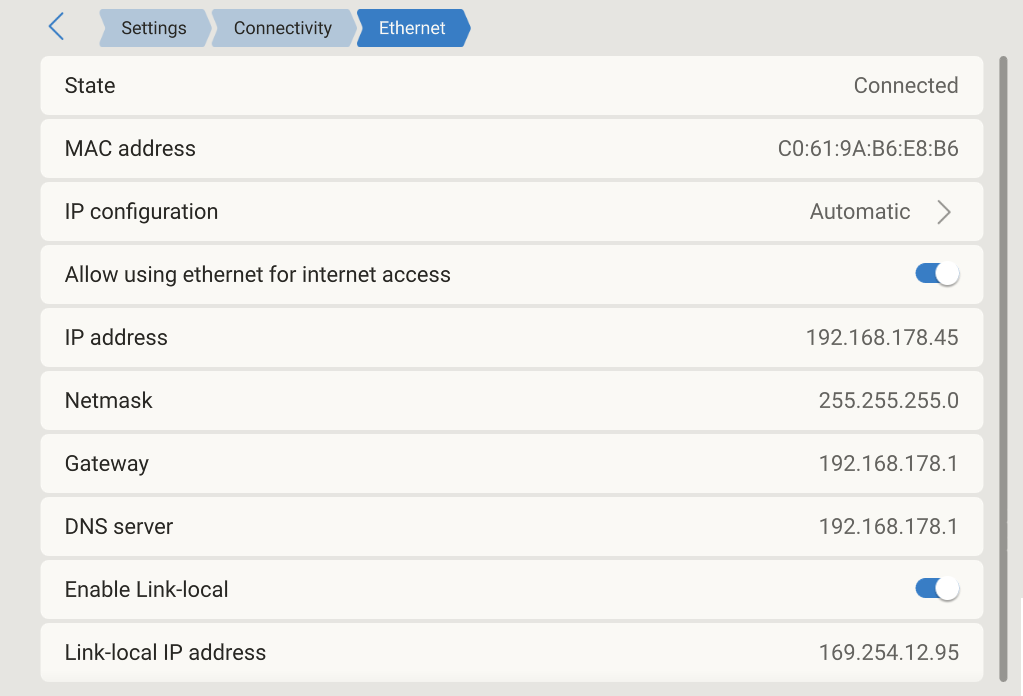
- Plug a network cable into the GX Ethernet port — not VE.Bus or VE.Can. On the GX go to Settings → Connectivity → Ethernet. State should show Connected, with an IP address and gateway, and “Allow using ethernet for internet access” switched on.
- For WiFi, open Settings → Connectivity → WiFi, choose the network, and enter the password. WPS is not supported. Built-in WiFi is 2.4 GHz only. Victron recommends at least 50% signal strength, and Ethernet when you can use it.
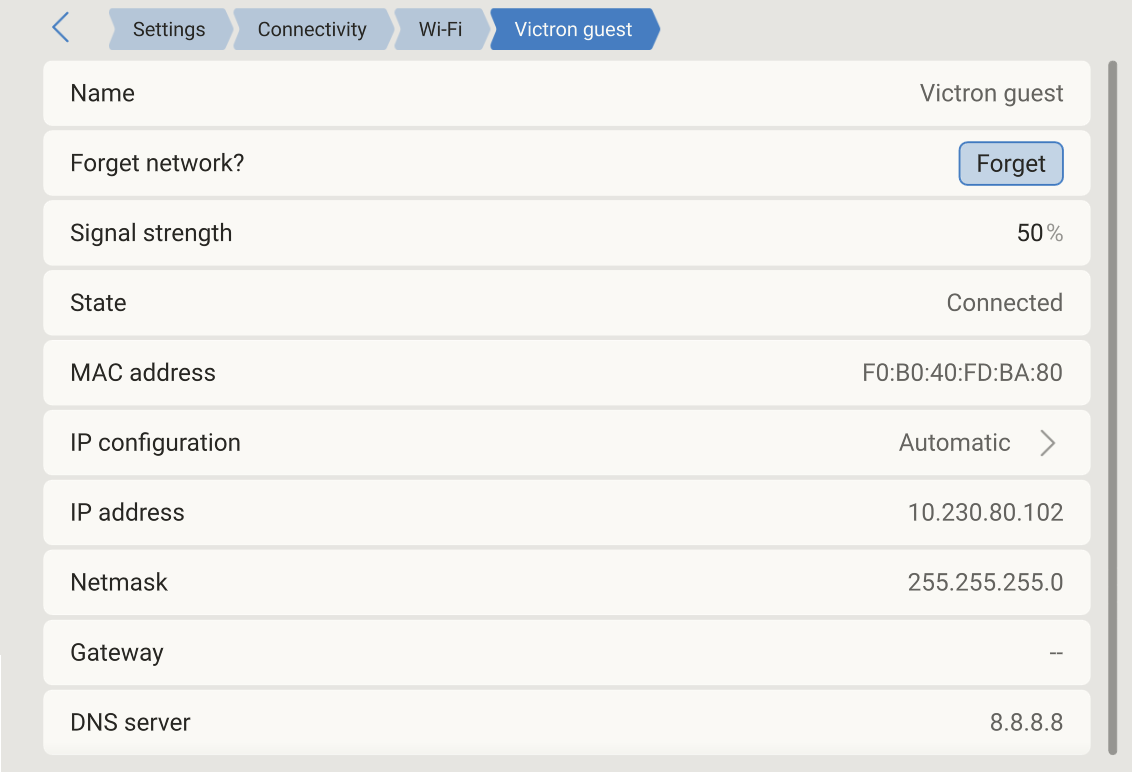
When State is Connected and Last contact later updates in the VRM online portal menu, the GX can talk to Victron’s servers. That is the baseline for remote Victron configuration.
Victron Cerbo GX manual — Internet connectivity
GX already online?
If Ethernet or WiFi shows Connected, the next step is VRM registration — or a free check of whether your inverter can be configured remotely.
Common questions
- Which Victron GX devices can go online?
- Cerbo GX, Cerbo-S GX, Ekrano GX, Venus GX, Color Control GX, Octo GX and built-in GX products such as MultiPlus-II GX and EasySolar II GX can all connect to the internet and VRM.
- Is Ethernet better than WiFi for remote Victron support?
- Yes. Victron treats Ethernet as more reliable. Use WiFi only when cabling is impractical, and keep signal strength at 50% or higher so VRM and Remote Console stay stable.
- Why does my GX show Connected but VRM is offline?
- LAN Connected only means the GX has an IP address. VRM also needs internet access allowed on that interface, a working gateway, and VRM Portal set to Full or Read-only. A remote technician can help diagnose this after a free compatibility check.
Next setup steps
Need this Victron system configured remotely?
Once the GX is online in VRM, I can assess remote configuration, ESS setup and diagnostics worldwide. The free pre-check confirms what can be done before anything is charged.
Screenshots and menu names are from Victron Energy product manuals and the VRM website, used here as setup illustrations. Victron, VRM, Cerbo GX, MultiPlus and related names are trademarks of Victron Energy B.V. Global Sun Hub is independent and is not affiliated with Victron Energy.